Dev License: This installation of WHMCS is running under a Development License and is not authorized to be used for production use. Please report any cases of abuse to abuse@whmcs.com

How to Delete a Database in cPanel

1. Log in to your cPanel account.


2. In the Databases section, click on MySQL Databases.


3. Under Current Databases, you can see a list of all your databases. Locate the database you want to remove and click on Delete.
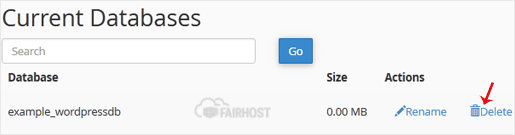

4. Click on Delete Database.

  • 0 Users Found This Useful
Was this answer helpful?

Related Articles

How to Create a Database in cPanel

1. Log in to your cPanel account.2. In the Databases section, click on MySQL Databases.3. In the...

How to Rename a Database in cPanel

1. Log in to your cPanel account. 2. In the Databases section, click on MySQL Databases.3. Under...

How to Create a Database Username in cPanel

1. Log in to your cPanel account. 2. In the Databases section, click on MySQL Databases.3. Under...

How to Add a User to a Database and Grant Privileges

1. Log in to your cPanel account. 2. In the Databases section, click on MySQL Databases.3....

How to Import a Database via phpMyAdmin in cPanel

1. Log in to your cPanel account.2. In the Databases section, click on phpMyAdmin.3. From the...

Powered by WHMCompleteSolution